You are currently viewing a snapshot of www.mozilla.org taken on April 21, 2008. Most of this content is highly out of date (some pages haven't been updated since the project began in 1998) and exists for historical purposes only. If there are any pages on this archive site that you think should be added back to www.mozilla.org, please file a bug.


Specification for P3P-based Cookie Management


1. Cookie Preference Panel
 
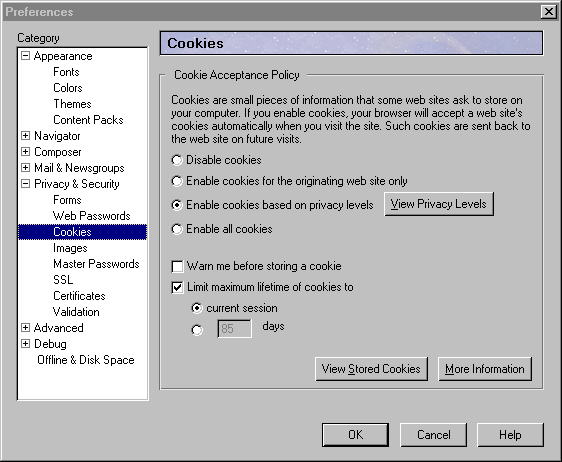
Cookies are small pieces of information that some web sites ask to store on your computer. If you enable cookies, your browser will accept a web site's cookies automatically when you visit the site. Such cookies are sent back to the web site on future visits. 
Disable cookies
Enable cookies for the originating site only
Enable cookies based on user privacy settings
Enable all cookies

Warn me before storing a cookie 


  • An "Enable cookies based on user privacy settings" choice has been added
  • A "View Privacy Settings" button has been added
  • The "View Privacy Settings" button will be enabled only when "Enable cookies based on user privacy settings" is selected.

  •  


    2. P3P Window

     
    Privacy Settings

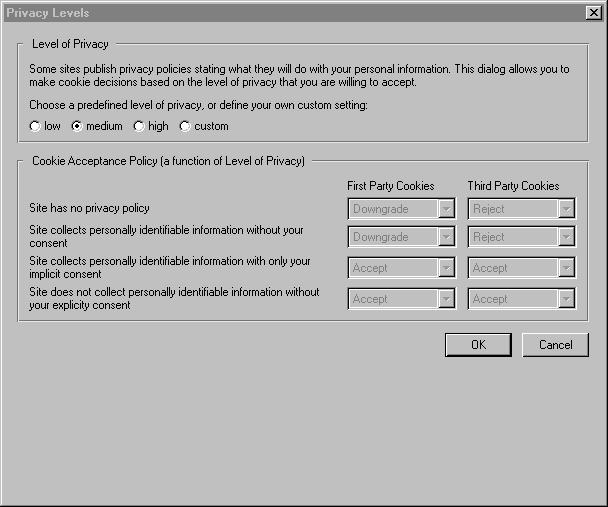
    Some web sites publish privacy policies which help Netscape distinguish the purpose of the cookies that the web site wants to set. 

        (Note: these settings override your basic cookie control preferences.)
    Choose a predefined privacy level, or define your own custom setting:
    Low Medium High Custom
      First Party   Third Party
    Cookies with no privacy policy  
    Cookies which use personally identifiable Information without your consent  
    Cookies which use personally identifiable Information with implicit consent only  
    All other cookies (including cookies which use personally identifiable information with your explicit consent)  

    Limit maximum lifetime of cookies to
    current session
    days 


  • This window appears when the "View Privacy Settings" button above is pressed
  • The box above is not displayed unless the "custom" radio button is selected.
  • Values in the box are remembered for the duration of the dialog in case the user unselects "custom" and then reselects it.
  • If the user alters the pulldowns manually then the setting becomes "Custom".
  • User can create a custom setting for "accept all" or "block all", or set those levels from the basic menu instead.
  • Radio buttons under "Limit maximum lifetime of cookie to" is enabled only when the checkbox is checked
  • Input field precedinge "days" is enabled only when that radio button is selected

  •  


    3. Second Thoughts (Changes to Spec)

    The above spec was discovered to have the following two flaws:
     

  • Cookie lifetime preference were not accessible unless "enable cookies based on privacy settings" was selected
  • There is no way for the user to know what the definition of low/medium/high is.

  •  


    To rectify these problems, the following changes are being made to the spec
     

  • Cookie lifetime preference are being moved into the main cookie preference panel
  • Accept/downgrade/reject matrix will always be visible but will be disabled unless "custom" is selected.

  • Also some minor wording changes were made as well.

    The revised pictures are as follows: