Improved Image Management
Requirements
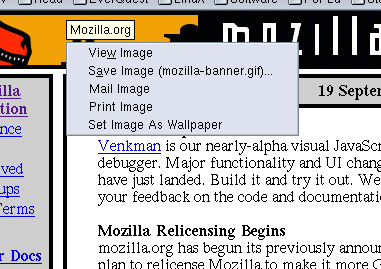
Provide the user with simple ways to e-mail an image, print an image, or set the image as the desktop background image, in addition to the current features of saving the image and displaying it by itself in the browser window.
Design
Once the back-end code needed for the above (new) features is written, we'll need ways to expose them through the UI. Existing ways for doing that are through the menus in the menubar and through context menus.
To make image features more discoverable we could additionally pop up a toolbar or menu when mousing over an image (similar to what tooltips do). As for placement, I'd favor the same place as a normal context menu, which would mean finding a new place for tooltips to pop up.
Time estimates
- Bug 00000 Send image - 1 day
- Bug 00000 Print image - 4 days
- Bug 41526 Set image as wallpaper (Window only) - 6 days (also see New Context Menu Items bug 103064)
- Bug 00000 Open My Pictures folder (Windows/Mac OS X?) - 2 days
- Bug 00000 Popup image toolbar or menu when mousing over an image - 3 days
History
Jag says:
This should all be done as context menu items and regular menu items. Perhaps
find a way to advertise context menus if (new) users have trouble discovering
those. The "in your face" toolbar IE6 uses is annoying in the same way popup
ads are. As IE6 also shows, it can't be used with image links (images which
are inside a <a href="..."> tag): say you move to the upper left corner
of your image link to click on it (since that was closest to your mouse),
and right before you click this toolbar pops up underneath your mouse. This
also effectively reduces the clickable area of your image link. It also
can't be used with images the same size or smaller than the toolbar it self.
Ben says:
I talked to jag on IRC, and he favours context menu options. This turns out to be a rather large feature (or collection thereof) actually, inspecting IE's implementation, which includes:
- Print Image (need to find a way to print an image without changing the currently loaded page - Mail does this currently by creating an offscreen window and printing that, although that itself has bugs) - 4 days.
- Send image in email (probably simple. < 1 day)
- Open "My Pictures" folder - Windows only, probably requires some analog of the code from the download dialog that opens the folder that contains the downloaded file. 2 days
Seems "Set as Wallpaper" goes with these from an engineering perspective, as one would probably create some kind of browser/shell image utility component for handling this type of thing.
The toolbar itself seems simple but there are subtleties - it is like a tooltip - coming up over the image on a timer, only appearing on images larger than a certain size, disappearing when the pointer exists the image, appearing onscreen at the same time as any tooltip for the image. There would also have to be a UI pref to disable this feature, as many wouldn't like it.
I'm being conservative because I think this is a potentially contentious feature and the details need to be taken care of well to minimize any offense.